
Here are the steps to login to ManageBac:
1) Browse to https://malverncollege.managebac.com/
2) Click "G-Sign-in with Google"
As shown in the screenshot below:
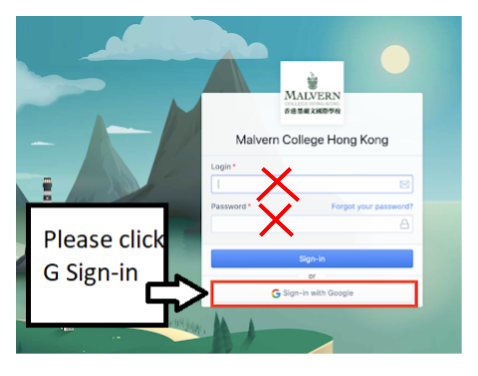
3) and then enter your full school email address - 12345678@mchk.edu.hk (example only)
4) click Next
5) enter your School Google password (The same one you use with Gmail, Chat, Meet etc)
6) click Next
Then you should be logged in!
Please note: the user experience may not be the best when browsing using Chrome app on a smartphone.
We highly recommend using a normal laptop or Mac, and the Chrome browser to access Managebac.
On smartphones: there is an app for Managebac.
Please use the relevant links below to install the app for your smartphone model:
iPhone:
Android:
The app should provide a better experience on a smartphone.
In order to login on the Managebac app:
- The trick is to first enter your Parent Google email address once
- and then click "Next"
- This will take you to the "G-sign-in with Google" button.
- Then please click the "G-sign-in with Google" button within the app
If you need any further assistance, please don’t hesitate to contact ICT Services on ictservices@mchk.edu.hk.
Best Regards,
ICT Services
Email: ictservices@mchk.edu.hk
Website: https://mchk.freshdesk.com