Logo

ICT Helpdesk

Welcome
Login  Sign up
Home Solutions
New support ticket
Check ticket status
Solution home Senior Teacher guides Senior Teacher guides

How to login to iSams (Teachers Print

Created by: ICT Support MCHK

Modified on: Mon, 7 Jul, 2025 at 11:50 AM


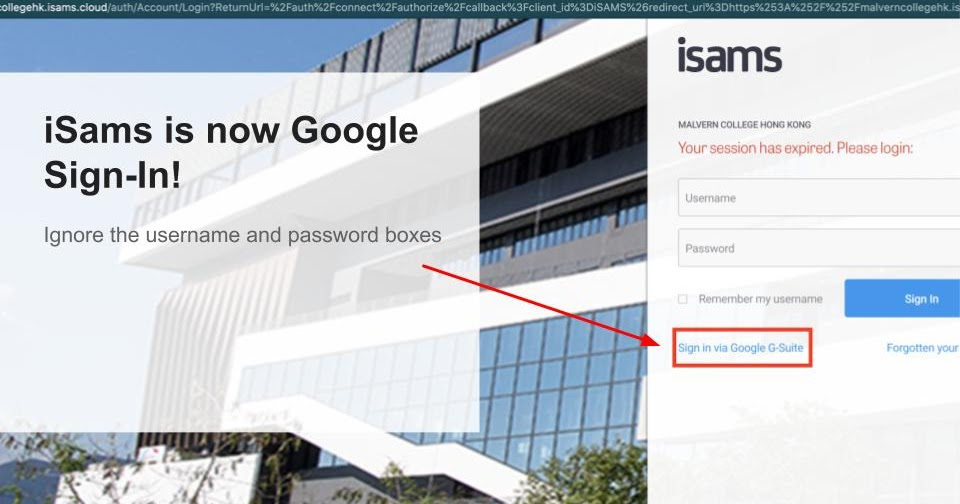
Log into iSams at https://malverncollegehk.isams.cloud/

Note that iSams may ask you to allow pop-ups in your browser before you can log in.

Log in using your MCHK Google account
by clicking on the Sign-In via Google G-Suite link at the bottom.


I hope this helps.


If you need any further assistance, please don’t hesitate to contact ICT Services on ictservices@mchk.edu.hk.


Best Regards,


ICT Services


Email: ictservices@mchk.edu.hk

Website: https://mchk.freshdesk.com


I
Ict is the author of this solution article.

Did you find it helpful? Yes No

Send feedback
Sorry we couldn't be helpful. Help us improve this article with your feedback.

Related Articles

    Home Solutions Cookie policy
    Help Desk Software by Freshdesk
    Article views count