
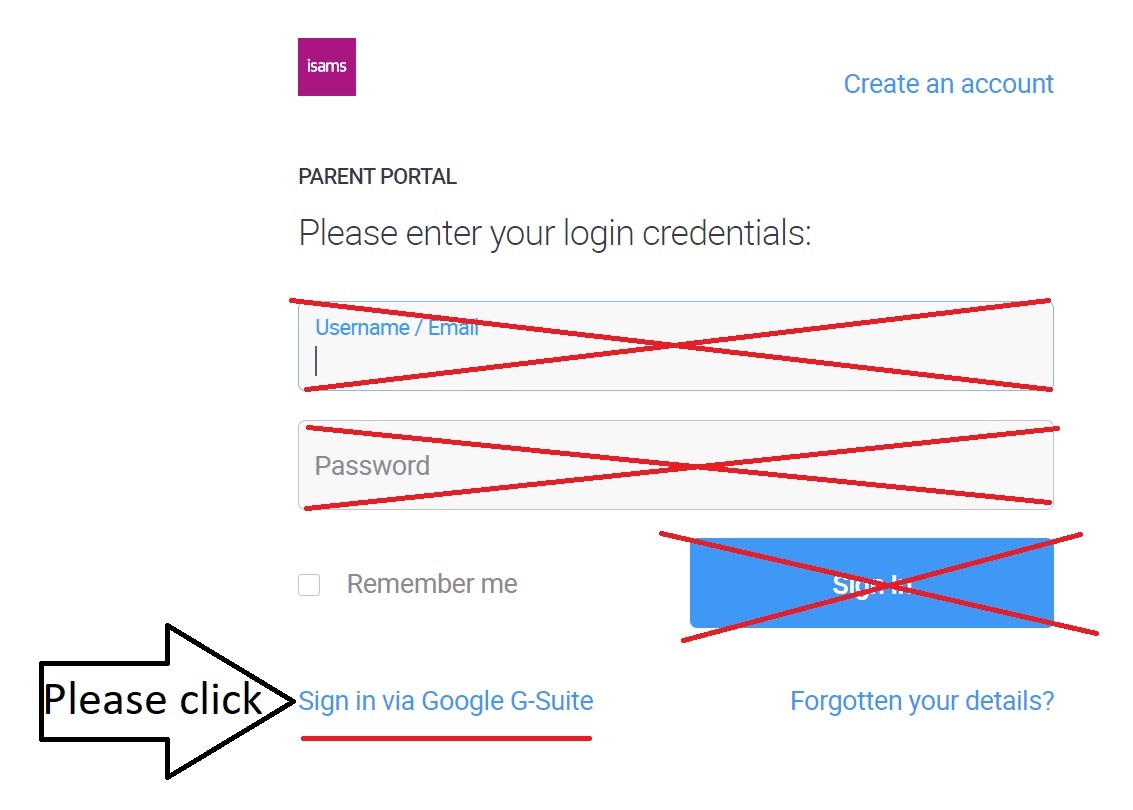
1. Please remember to click the "Sign-in with Google G-Suite" link.
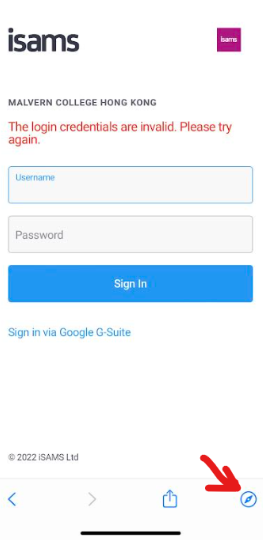
2. If an error prompts, please click the Compass icon in the bottom right-hand corner. This will allow you to switch to your MCHK parent Google account login.
3. If those tips do not work, please try to clear your Chrome app's browser cache.
Here are the steps to clear your Chrome app's browser cache on iPhone and Android devices:
Clear Cache and Cookies - Chrome for iOS
Clear Cache and Cookies - Chrome for Android
4. If clearing the browser cache doesn't work, please try to restart your mobile phone.
Please try each tip one-by-one in order from top to bottom.
Please check the login to the Parent Portal after trying each tip.
I hope one of the above tips helps you with access to the iSams Parent Portal (iParent app).
If you need any further assistance, please don’t hesitate to contact ICT Services on ictservices@mchk.edu.hk.
Best Regards,
ICT Services
Email: ictservices@mchk.edu.hk
Website: https://mchk.freshdesk.com