To add a website to an Android phone home screen
Open Google Chrome and go to the website.
Then drop down the menu by tapping the screen’s three-dot icon at the top right-hand corner.
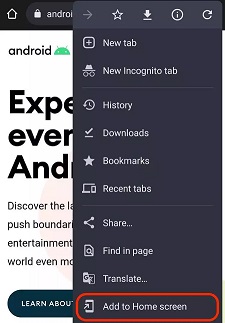
Select Add to Home screen.

Modified on: Wed, 31 Jul, 2024 at 9:35 AM
To add a website to an Android phone home screen
Open Google Chrome and go to the website.
Then drop down the menu by tapping the screen’s three-dot icon at the top right-hand corner.
Select Add to Home screen.
Did you find it helpful? Yes No
Send feedback