
Please try the following:
To change the format of photos to JPG permanently
In iPhone (or iPad) settings > Camera > Formats > select "Most Compatible" , then the new photo taken should be in JPEG format
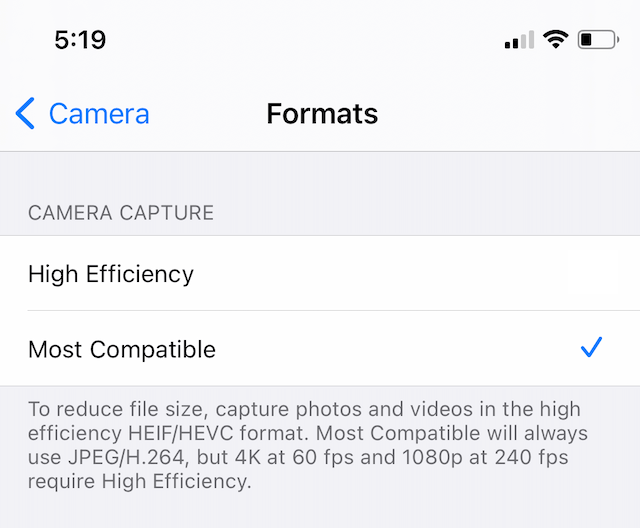
How to send photos from your iPhone as JPG, not HEIC
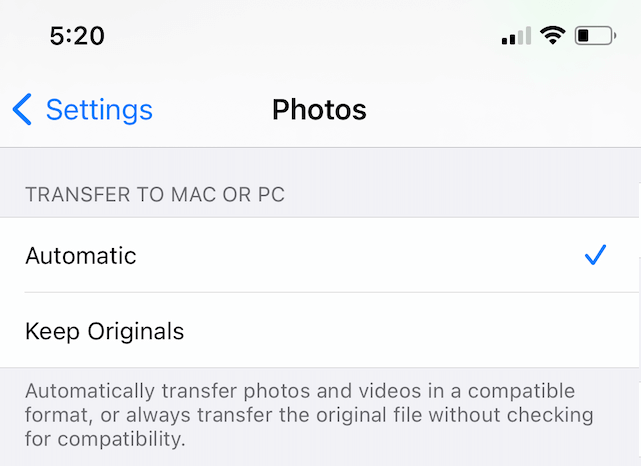
Another option you have is to keep shooting pictures as HEIC but to share them as JPGs. Here’s how to convert a HEIC to JPG when you share it from your iPhone/iPad:
- Open the Settings app.
- Tap Photos.
- Scroll down to the Transfer to Mac or PC section.
- Choose Automatic.
Then the photos should transfer in JPG format.
This website has some more tips:
https://backlightblog.com/iphone-heic-to-jpg
https://backlightblog.com/iphone-heic-to-jpg
I hope this helps with your issue.
Please ask if you have any further questions.